
As we know Windows 8 RTM is released to public. One of the new feature included in the Windows 8 is Metro Boot Menu. Which is completely different from old one's. And it also allows the mouse pointer to select an operating system.
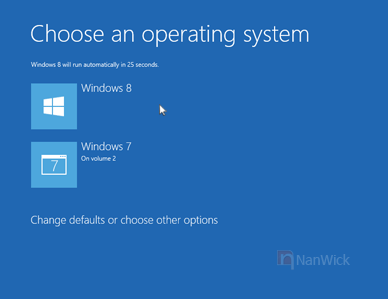
But the things that troubles users are :
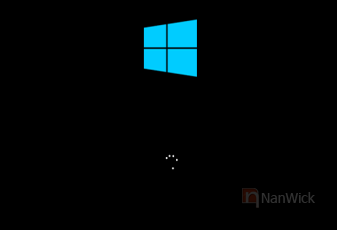
1. It appears a loading screen before Boot menu :
2. For users with dual operating systems, If you are selecting an O.S other than Windows 8 it'll boot only after restart.
Comparing to new Boot Menu, the old one is fast and simple. It might be better getting old boot menu for the users with dual O.S. Windows 8 Switch Boot is a solution for this problem.
You can bring back the Old Standard Windows 8 Boot Menu with NanWick Windows 8 Switch Boot. :
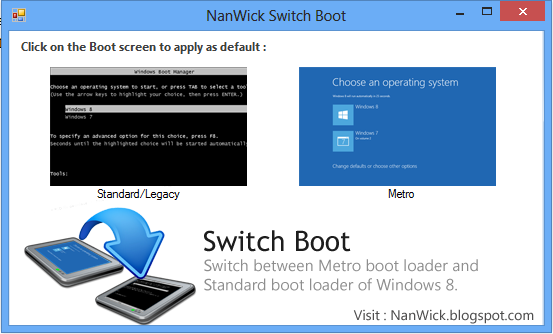
This tool will help you to switch between Metro Boot Screen and Standard boot screen. You can download this using the following link :
The users who are interested to what happens behind this tool and to do this manually check out the following steps:
1. First Goto %windir%\system32\ . (%windir% = C:\Windows if you have installed Windows in C drive)
2. Find cmd.exe. Once you find it Right click on cmd.exe and select Run as administrator.
3. Select any one of the following two commands and type it in the Command line window.
But the things that troubles users are :
1. It appears a loading screen before Boot menu :
2. For users with dual operating systems, If you are selecting an O.S other than Windows 8 it'll boot only after restart.
Comparing to new Boot Menu, the old one is fast and simple. It might be better getting old boot menu for the users with dual O.S. Windows 8 Switch Boot is a solution for this problem.
You can bring back the Old Standard Windows 8 Boot Menu with NanWick Windows 8 Switch Boot. :
This tool will help you to switch between Metro Boot Screen and Standard boot screen. You can download this using the following link :
The users who are interested to what happens behind this tool and to do this manually check out the following steps:
1. First Goto %windir%\system32\ . (%windir% = C:\Windows if you have installed Windows in C drive)
2. Find cmd.exe. Once you find it Right click on cmd.exe and select Run as administrator.
3. Select any one of the following two commands and type it in the Command line window.
bcdedit /set {default} bootmenupolicy legacy -To get old Boot screenDon't forget to share your feedback about this tool :)
bcdedit /set {default} bootmenupolicy standard -To get Metro style Boot screen

I was searching for this. Thanks for sharing.
ReplyDeleteIt works with windows vista?
ReplyDeleteNo. It is only compatible with Windows 8.
DeleteI mean...could it ring back Windows Vista style Boot Menu?
DeleteI think both Windows Vista and Windows 7 uses same Boot Menu in case of multiple OS.
DeleteOk, thanks.
DeleteI do not even know how I ended up herе, but Ι thought this post was
ReplyDeletegood. I ԁon't know who you are but definitely you're gοing to a fаmous blοgger іf you arе not alrеady ;)
Chеers!
My web site - Insanity The Asylum Workout Tips
thanks for the tool :)
ReplyDeletethanks for the Simple but lovely tool :)
ReplyDeleteTech Updates
It doesn't work for me. Check info below and help me out, thanks.
ReplyDeleteC:\Users\8>bcdedit /set {default} bootmenupolicy standard
The element data type specified is not recognized, or does
specified entry.
Run "bcdedit /?" for command line assistance.
Element not found.
C:\Users\8>bcdedit /set {default} bootmenupolicy standard
I think you are using the Windows 8 Developer preview or Consumer Preview. Please note that it'll only work with Windows 8 RTM.
DeleteHi I followed your trick about getting the Metro style Boot screen but now my system boots strait away in windows 7 and no trace of windows 8.The drive for 8 is E and I tried to reverse the trick by doing the same thing but i can t access cmd in drive E:,it says "E:\Window\System32\cmd.exe is not valid Win32 application."
ReplyDeleteAny idea?
Need help.
I think you're tried to acces cmd.exe located in Windows 8 directory from Windows 7, which is not possible. And these commands will only work in Windows 8.
DeleteTo get your Windows 8 back insert Windows 8 dvd , restart your pc and select Repair -> Startup and repair.
This is a awesome tool thanks
ReplyDeleteI have same problem as Anon 4 January 2013. However my version of W8 is downloaded from Microsoft.
ReplyDeleteHow do I invoke the repair function on this?
Anonymous
Boot into Windows 8 DVD. On the installation window click "Repair your computer". Once you done it click "Startup and repair" in following window. It'll automatically restart your pc and windows will be repaired.
DeleteThank you share this!!!!
ReplyDeleteI got this web page from my buddy who informed me about this web site and at the moment this time I am browsing this web page and reading very informative
ReplyDeleteposts at this time.
Feel free to visit my homepage ... windows 7 loader by DAZ v2.2.1
hollister, ugg, chi flat iron, uggs on sale, air max, moncler, moncler, ugg boots, ferragamo shoes, canada goose, ugg boots, ralph lauren, instyler ionic styler, soccer shoes, marc jacobs, canada goose outlet, ray ban, giuseppe zanotti, mcm handbags, cheap oakley sunglasses, converse, jimmy choo, ugg boots, vans, cheap sunglasses, bottega veneta, canada goose, canada goose outlet, oakley sunglasses cheap, babyliss pro, asics, insanity, ugg, canada goose, canada goose, gucci, oakley sunglasses outlet, celine handbags, p90x, valentino shoes, herve leger, oakley, soccer jerseys, oakley vault, moncler, tn pas cher, louboutin, ghd, moncler outlet
ReplyDeleteIf some one wishes to be updated with hottest technologies then he must
ReplyDeletebe pay a quick visit this web page and be up to
date daily.
As batatas com bebedeira levam 8 minutos quase.
ReplyDeleteAhaa, its fastidious discussion concerning this paragraph at this place at this weblog, I have read
ReplyDeleteall that, so at this time me also commenting at this place.
Excellent blog! Do you have any tips for aspiring writers?
ReplyDeleteI'm hoping to start my own website soon but I'm a little lost on everything.
Would you propose starting with a free platform like Wordpress or
go for a paid option? There are so many options out there that I'm totally confused ..
Any ideas? Cheers!
Keep on working, great job!
ReplyDeleteI'll immediately take hold of your rss feed as
ReplyDeleteI can't find your email subscription link or e-newsletter service.
Do you have any? Kindly let me recognize so that I could subscribe.
Thanks.